What Is Google Preferred Sources and How to Add It to Your Website?

Joosep Aedma

Key takeaways
Google Preferred Sources lets people choose websites whose content they want to see more often in Google.
Since 2026, these preferences have been used not only in Top Stories, but also in AI Overviews and AI Mode.
On August 20, 2026, Google released a new interactive button that can be added to a website with two simple HTML elements.
Adding the button does not automatically improve SEO or overall AI visibility. Its effect applies only to people who choose your site as one of their Preferred Sources.
Introduction
In August 2026, Google gave website owners a new option: a button that lets readers mark your website as a Preferred Source in Google. The feature itself is not completely new. Until now, people had to manage their preferred sources inside Google’s own interface. The new button lets you bring that choice directly onto your website.
This is most interesting for businesses that regularly publish fresh articles, guides, news, or other useful content. Your readers can now quickly tell Google: “I want to see more from this source.”
There are a few important limits from an SEO and GEO perspective. Preferred Sources is not a new SEO or GEO ranking factor, and simply adding the button does not automatically give your website better rankings or more AI citations. It is a user-controlled preference that may make your content more visible to that specific person.
What is Google Preferred Sources?
Preferred Sources is a Google Search personalization feature that lets users choose which websites they want to prioritize in their search results. The concept is straightforward: if you have a favorite publication, blog, or trusted expert source you read regularly, you can now easily signal this preference to Google.
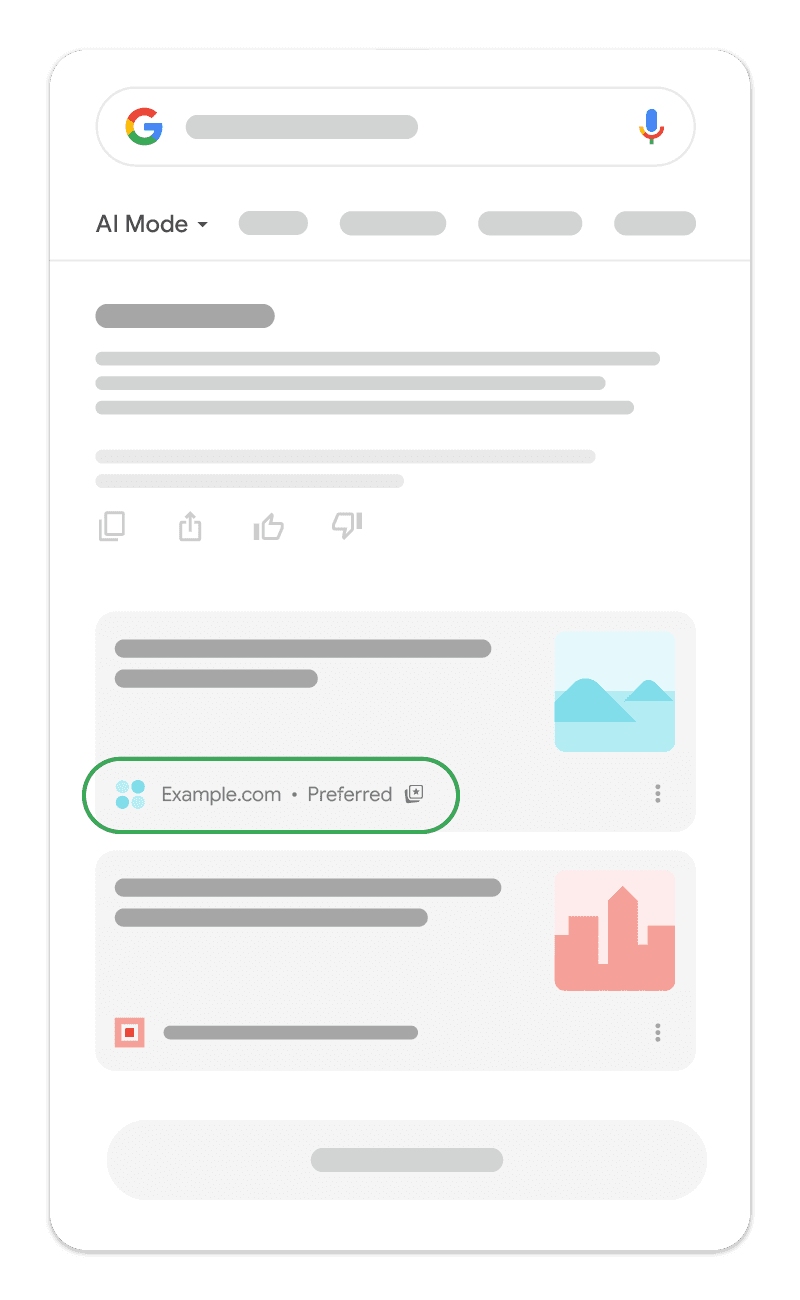
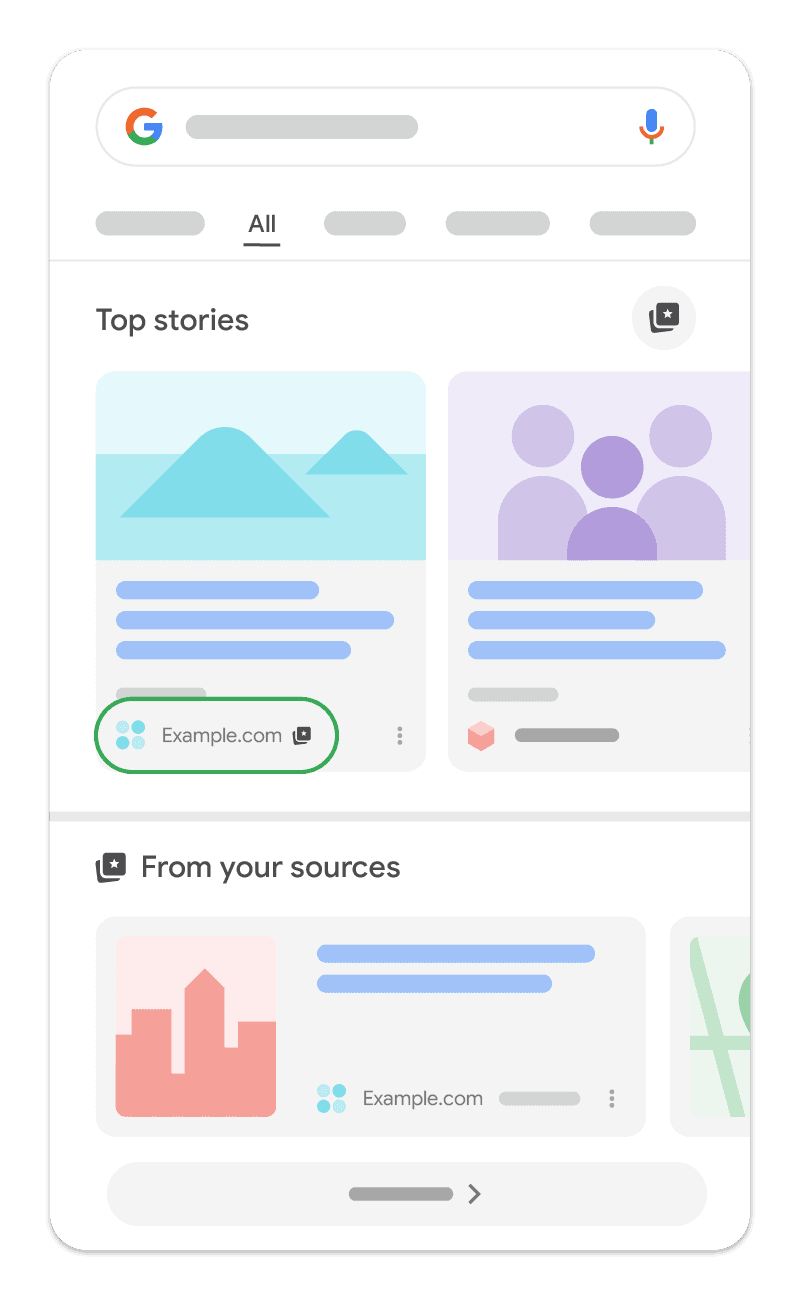
Regarding Top Stories, Google notes that fresh, relevant content from your chosen sources is more likely to appear with a "Preferred" label. In 2026, Google expanded this feature to AI Overviews and AI Mode, where Preferred Source links can also stand out with a distinct "Preferred" tag.
 |  |
The key here is personalization. Selecting a specific business news site as a preferred source doesn't boost its ranking for everyone. Instead, Google tailors the search experience specifically for you, prioritizing your selected sources in your personal search results.
Why are people talking about it now?
Preferred Sources rolled out in stages. The feature first appeared around Top Stories in 2025, expanded to all Google Search-supported languages in spring 2026, and was later brought into AI Overviews and AI Mode in May.
The newest change came on August 20, 2026, when Google released a new interactive Preferred Sources button for website owners. Readers no longer need to find the right setting inside Google on their own. Publishers and businesses can put the option directly in front of them.
According to Google, by August 20 users had already selected more than 600,000 different sources as Preferred Sources.
What changed with the new “Add as Preferred Source” button?
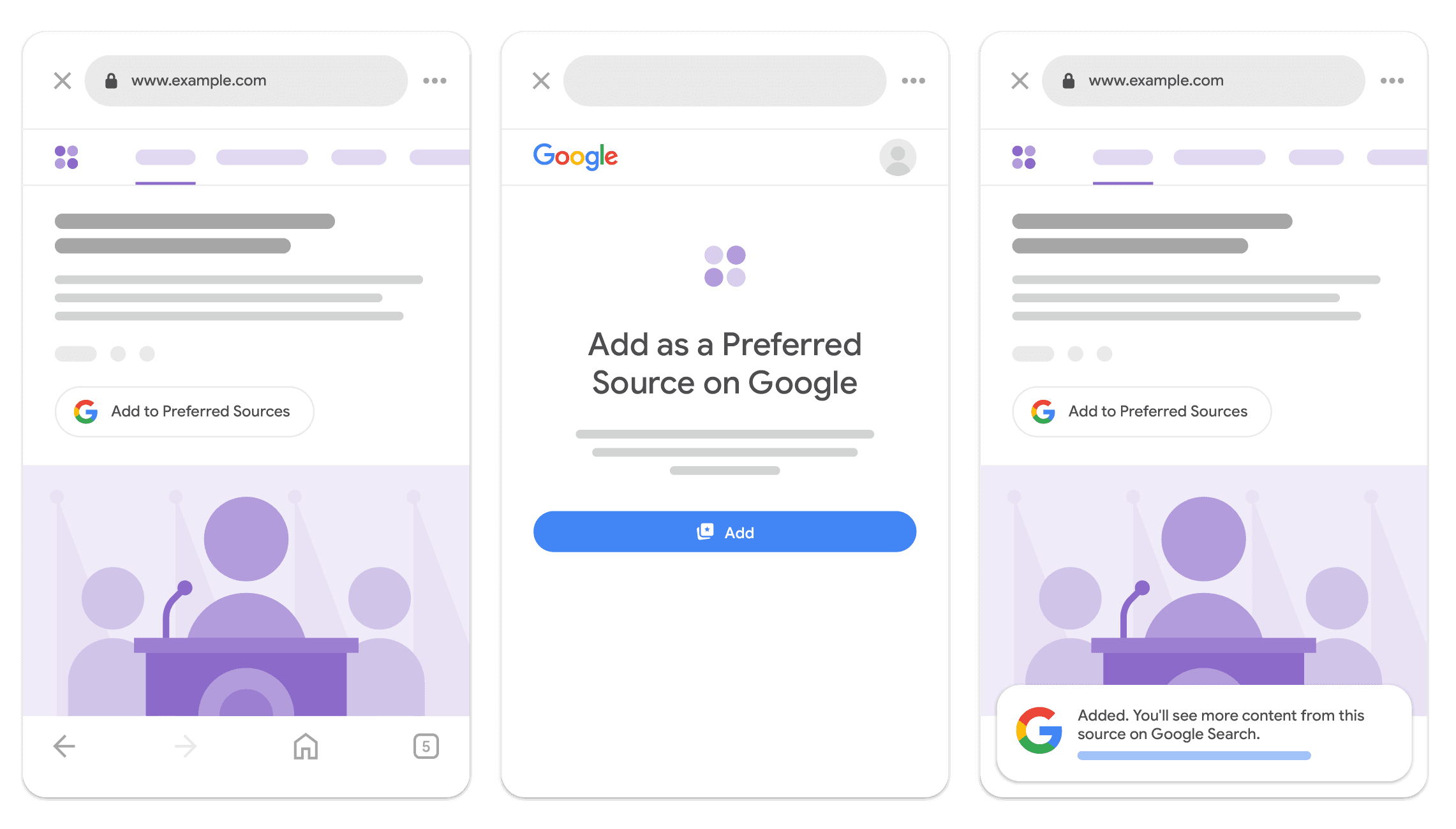
The point of the new interactive option is to make the process a more natural part of the reader experience. A person clicks the button on your website, confirms in Google that they want to add the site as a Preferred Source, and then continues from where they left off.
That makes the button especially sensible near or at the end of a blog post, where someone has just consumed your content and may be interested in seeing more from you later.

Google also makes it clear that adding the button or a deeplink does not automatically make your site a Preferred Source. These tools simply make it easier for readers to choose you.
Who is this feature for?
Preferred Sources may sound like a feature only for news publishers, but Google describes it more broadly. A website that publishes fresh content can be a good fit for Preferred Sources, which means business blogs can also qualify.
The emphasis should be on regularly publishing fresh, useful information. If your website consists only of a homepage, a few old service pages, and a blog that has not been updated in years, there is little reason for people to choose it as a preferred source. Google also notes that sources that are not updated regularly may not be available in Source Preferences.
The most logical candidates are businesses that have an ongoing relationship with their audience. For example:
an accounting firm that regularly publishes guides about IRS changes, tax deadlines, and reporting requirements
a home improvement company that publishes practical renovation and maintenance advice
a B2B service provider that shares industry research, practical guides, and insights from its work
How to Check If Your Website Qualifies as a Google Preferred Source
The easiest way to check is by looking up your domain in Google’s Source Preferences.
You can do that HERE.
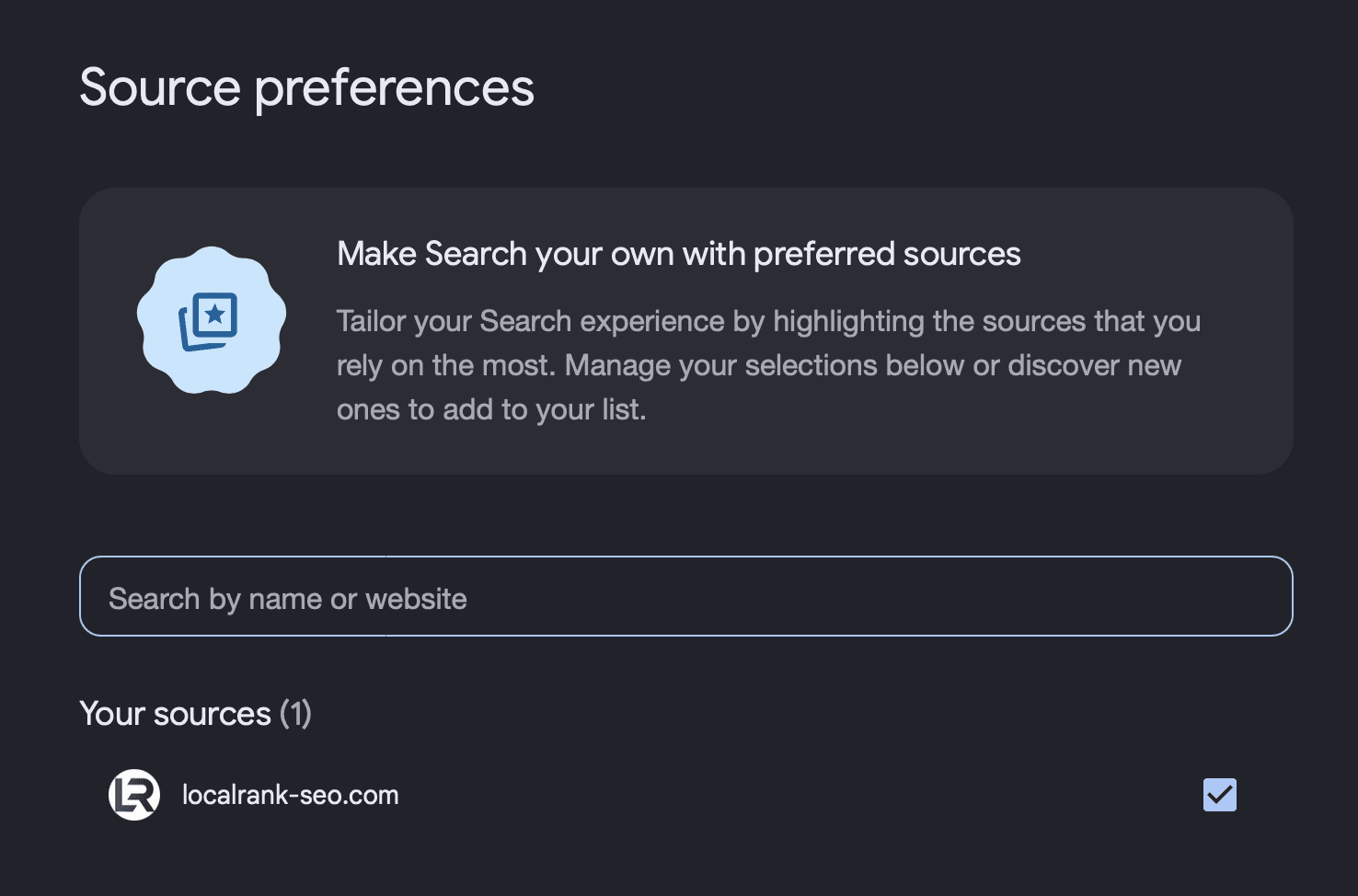
Alternatively, you can use a direct deep link containing your domain in this format:
https://www.google.com/preferences/source?q=yourdomain.com
If your domain is listed in Google’s Source Preferences, users can select it as their preferred source. Currently, Google does not support manually adding websites to this list.
However, there is a technical detail that matters for companies with blogs. A Preferred Source can only be a domain or subdomain, not a specific subdirectory.
For example, you can select localrank-seo.com or blog.localrank-seo.com as a preferred source, but not localrank-seo.com/blog. If your blog resides in a subdirectory of your main domain, users will select the entire domain as their preferred source.
How to Add the "Add as Preferred Source" Button to Your Website
Google's standard JavaScript solution is remarkably straightforward. First, insert Google's publisher.js script into the <head> section of your website to load the Preferred Sources functionality:
<script async src="https://news.google.com/swg/js/v1/publisher.js"></script>
Next, place the element where you want the Google button to appear:
<div google-add-preferred-source-btn></div>
Google recommends loading the script in the <head>, while the button's div element can be placed wherever it fits your user experience. This standard setup automatically detects and applies the user's preferred browser language. Google fully supports Estonian as well.
To lock in a specific language, simply define it in the element:
<div google-add-preferred-source-btn data-lang="en"></div>
For dark mode websites, the standard solution also supports a dark theme:
<div google-add-preferred-source-btn data-theme="dark"></div>
Implementation details will vary slightly depending on your CMS. In Framer, add the script via Custom Code and inject the button using an Embed component. The process is identical for WordPress, Webflow, and other platforms: load the Google script sitewide and insert the HTML element where you want the button to display.
If JavaScript is not practical, use a deeplink
Not every website platform makes it easy to add external JavaScript. In that case, Google offers another option: a Source Preferences deeplink.
https://www.google.com/preferences/source?q=example.com
Replace example.com with your own domain. The link takes the user directly to Google, where they can choose your website as a Preferred Source. The experience is not quite as seamless as the new interactive button, but it is very easy to implement because you can use it behind a normal text link or your own custom-designed button without loading Google’s JavaScript.
You can also use the deeplink outside your website. For example, you can add it to an email newsletter, LinkedIn post, or another channel where people already follow your content. That makes Preferred Sources more than just another technical button on a website: it can also become a simple way to keep your existing audience closer to your content inside Google.
Should you use Google’s button or create your own design?
The simplest option is Google’s standard implementation. It includes automatic localization, Google’s own visual treatment, and the interactive selection flow while requiring very little development work. For most small and mid-sized businesses, this is a good starting point.
If Google’s standard button does not fit your website design, Google also provides an advanced JavaScript option. This lets you create your own button design while the Preferred Sources action still runs through Google’s system. It gives you more design freedom, but requires more technical setup.
The third option is a deeplink. It gives you the most control over the button design and CTA text, but it sends the user to Google’s Source Preferences page and does not provide the same embedded return flow as the interactive button.
There is no single best implementation for every website. The right choice depends on how much design control you need and how easily your platform supports external scripts.
Where should you place the button?
Google doesn't mandate placing the Preferred Sources button in the header, footer, or any specific spot within your articles. Approach this strategically by focusing on the overall user experience.
Positioning the button at the end of a blog post or on your main blog archive page often yields the best results. At this point, readers have already engaged with your content and understand the value your brand delivers. Boost engagement with a subtle CTA like: "Add us as a Preferred Source on Google to catch our latest insights."
Placing the button in your homepage hero section rarely works, as new visitors haven't yet experienced your brand's expertise. The Preferred Source button converts best once you've already built trust and demonstrated value through high-quality, consistent content.
What Happens After a User Selects a Preferred Source?
The impact of selecting a Preferred Source depends on where Google applies this preference. In Top Stories, Google explicitly states that fresh, relevant content from the selected source is more likely to appear and will feature a "Preferred" label.
For AI Overviews and AI Mode, Google adopts a more cautious tone. If content from the preferred source is cited, Google may highlight it with a "Preferred" badge. However, Google does not guarantee that your preferred source will appear in every AI response or always outrank other sources.
Google shared an intriguing statistic on Preferred Sources adoption. According to their data, users are twice as likely to click on a site after marking it as a Preferred Source. However, this is not a guarantee of doubled web traffic. Google has not disclosed the methodology, sample size, or whether this impact remains consistent across different industries and site types.
Does Preferred Sources Boost SEO or AI Visibility?
Adding the Preferred Sources button won't automatically improve your search rankings, indexing, or general AI visibility. Google does not treat this as an SEO or GEO ranking signal.
Instead, the real value lies in personalization. Preferred Sources helps put your content directly in front of the users who have explicitly chosen to trust you, delivering targeted visibility to your most valuable audience, rather than the entire web at once.
Should a U.S. business add a Preferred Source link to its website?
If your business regularly publishes fresh, useful content and your website appears in Source Preferences, adding the button is a low-effort option worth testing. It is especially relevant for sites where a blog or knowledge base is already part of the SEO, GEO, or content strategy and where readers may want to return to the same source.
For U.S. businesses, the timing is also interesting. Preferred Sources was already available in the U.S., but the publisher-facing interactive button only launched on August 20, 2026. That does not create an early-mover SEO advantage, but it does give businesses a chance to introduce the feature to their existing audience before the button becomes a common part of websites.
If you do not publish fresh content consistently, I would not make the Preferred Sources button a priority. In that case, improving the core website content, service pages, Google Business Profile, and other SEO and GEO foundations is likely more important. A new button cannot fix weak content or create a reason to follow a business if that reason does not already exist.
Practical checklist
Does your domain appear in Google Source Preferences?
Do you publish fresh content regularly that people may want to read again in the future?
Does your website platform support Google’s JavaScript, or would a deeplink be simpler?
Does the standard button language and design fit your website?
Does the button work properly on both desktop and mobile?
Does the confirmation flow return the user to the right place?
Does your CTA explain why someone should add your site as a Preferred Source?
Will you continue publishing fresh, useful, and up-to-date content after adding the button?
Summary
Google Preferred Sources gives website owners a simple way to encourage readers to mark their site as a preferred source inside Google. It makes the most sense for businesses and publishers that regularly create content people want to keep following.
The new “Add as Preferred Source” button makes that choice easier for readers, and the use of Preferred Sources in AI Overviews and AI Mode makes the feature even more interesting. It is not an SEO or GEO trick, but rather another way to make your content easier to notice in Google for the people who already value it.
FAQ
Does the Preferred Sources button improve Google rankings?
No. Google does not treat Preferred Sources as an SEO ranking factor, and adding the button does not automatically improve rankings or indexing.
Can every website be selected as a Preferred Source?
Not necessarily. The website needs to appear in Google’s Source Preferences, and Google particularly highlights sources that publish fresh and regularly updated content.
Does Preferred Sources affect AI Overviews and AI Mode?
Yes. Google uses a person’s preferred sources in AI Overviews and AI Mode, where links from those sources may be highlighted with a “Preferred” label.
Is adding the “Add as Preferred Source” button required?
No. The button is not required for your website to be available as a Preferred Source. Its purpose is simply to make it easier for readers to add your site as one of their preferred sources.
Share this post with others.